Download for macOS


MiniCPM-OCR on MLX-VLM: document parsing on Apple silicon

Meet MiniCPM-OCR 1.0 and Jev, two compact models from OpenBMB for turning documents into usable text and assessing the result. We have brought both to MLX-VLM, with public checkpoints ready to run locally on your Mac.
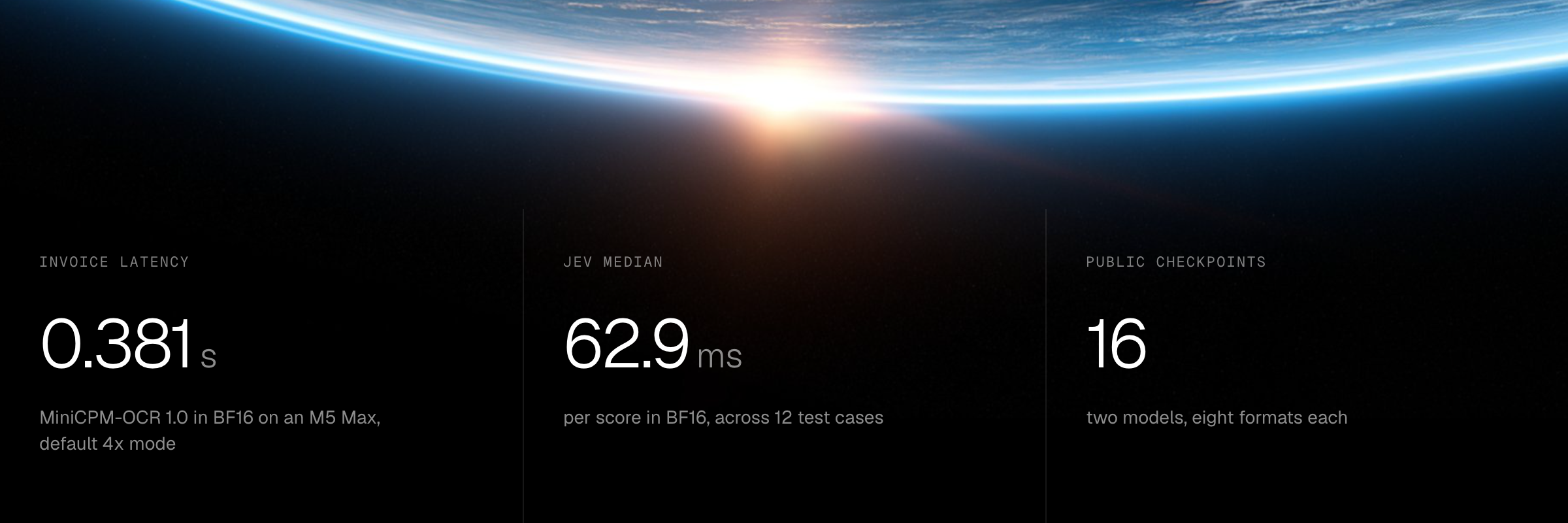
Read the page. Assess the output.
A scanned invoice, a photographed table, or a page from an archive starts as pixels. OCR makes that content searchable and reusable. The next question is how well the extracted text agrees with the source.
MiniCPM-OCR 1.0 is a 1.3B document parser. Jev is a separate 2B classifier that evaluates an OCR candidate against an original document region. Together, they give developers a local extraction step and a signal for deciding what deserves a closer look. See the official model overview.
The implementation is merged in MLX-VLM. This article covers the port, our M5 Max measurements, and the available quantized models. It also shows how to run each stage from Python or the command line.
Small model. Real document work.
The OCR model combines a SigLIP vision encoder with a Qwen3.5 language backbone. Image slicing preserves local detail, while visual compression controls how many image tokens reach the language model. The default mode is 4x; the port also supports 16x and adaptive image upscaling. Architecture and processor details
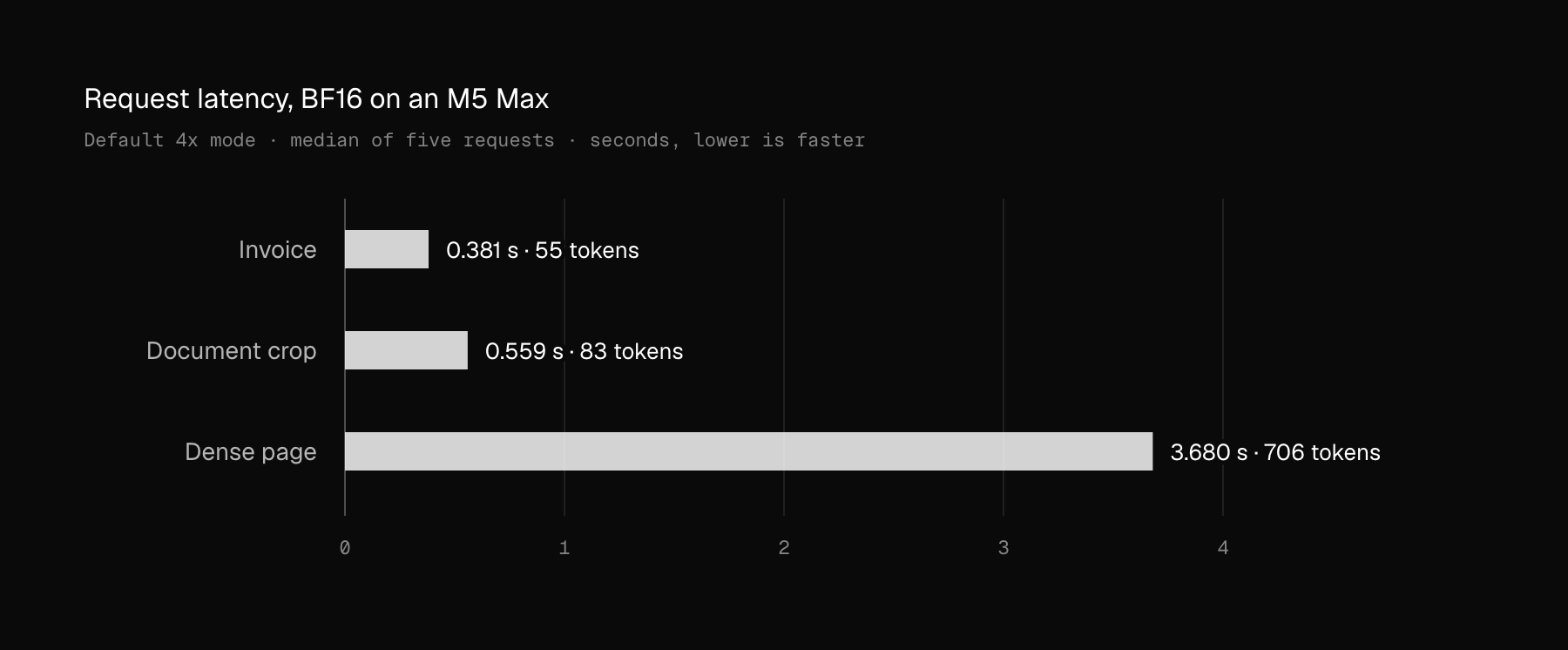
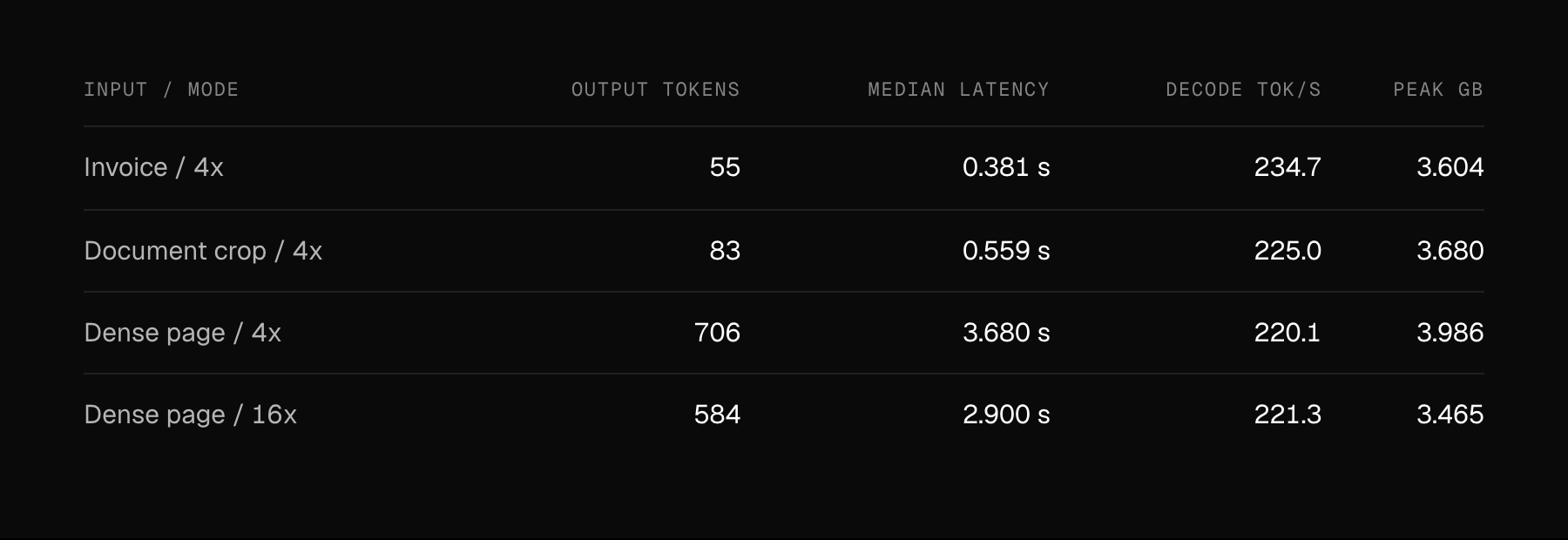
Compression changes the workload
For the dense page, 16x reduced prompt tokens from 2,564 to 674 and median latency from 3.680 to 2.900 seconds. It also changed the answer: 4x returned the table without its heading and footer; 16x included them, with plain-text table rows.
These are different outputs, so the timing difference is not an accuracy-equivalent speedup. Compare the extracted content on your own pages before selecting a mode. Decode speed alone also does not describe complete page-processing throughput.
A second model for a second look.
Jev asks whether a candidate OCR result is consistent with the source region. It receives three inputs: the original crop, the candidate text, and an image rendered from that text. Its two-output classifier returns a consistency probability rather than generating another transcription. Jev scoring interface
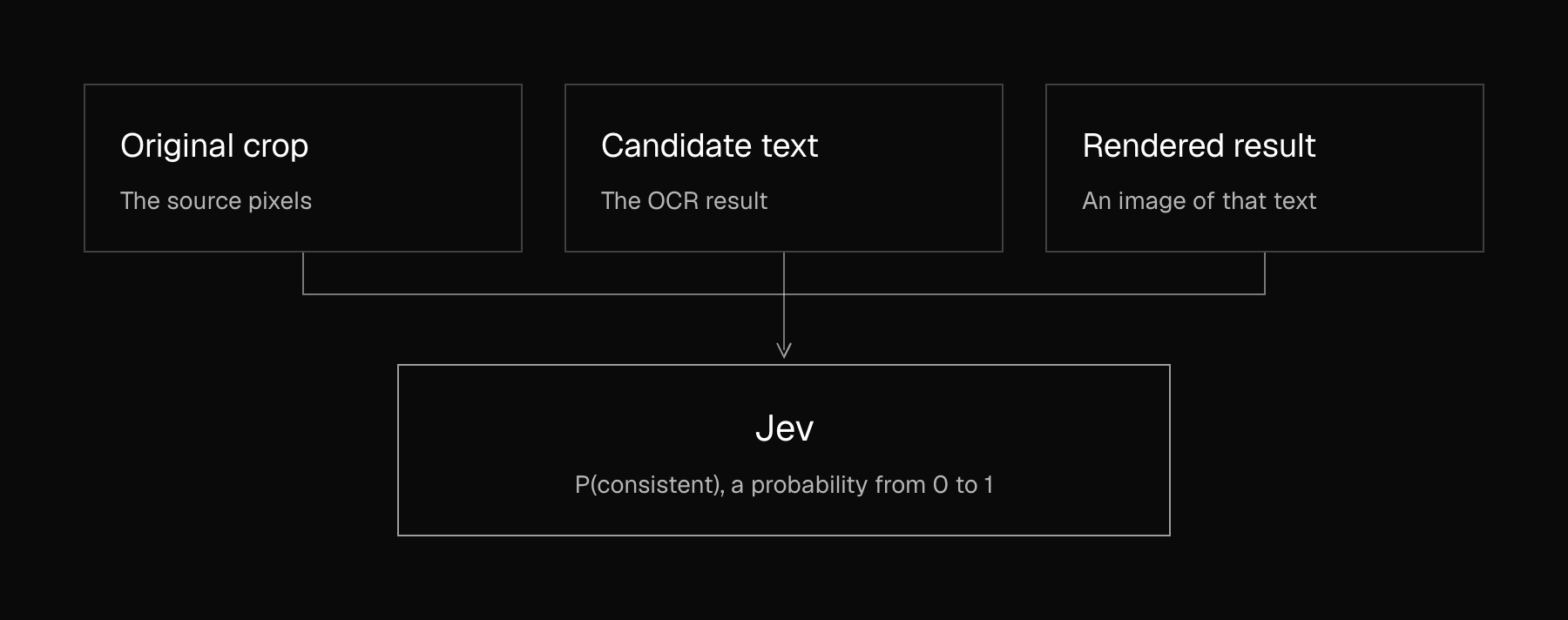
The MLX-VLM helper exposes this as prob_1; prob_0 is P(inconsistent). A value near zero means confidently inconsistent. Rendering the candidate image is a separate step that you supply before calling the scorer.
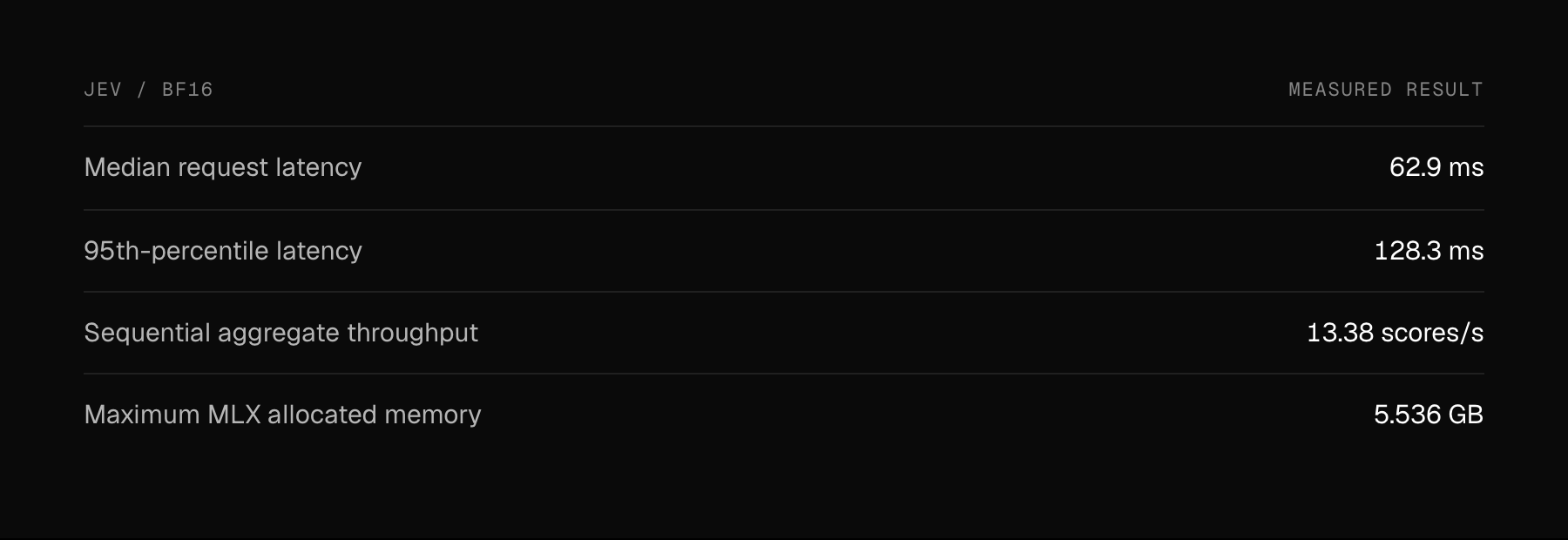
How we measured
All timings use an Apple M5 Max with 40 GPU cores and 128 GiB of unified memory, on AC power. We ran MLX 0.32.4, Python 3.12.15, and macOS 27.0.1, with batch size one, a resident model, one warmup per case, and five measured repetitions.
Requests start with fresh state and no reused image features. Timing includes image-file decoding, preprocessing, inference, and output decoding, with MLX synchronized at request boundaries. Jev text is preloaded. Memory figures exclude CPU-only image buffers and other apps; OCR and Jev were measured separately.
Eight formats for each model.
Both models are public in nativ-community, in BF16 and seven quantized formats. The table shows weight-file storage, not runtime memory.
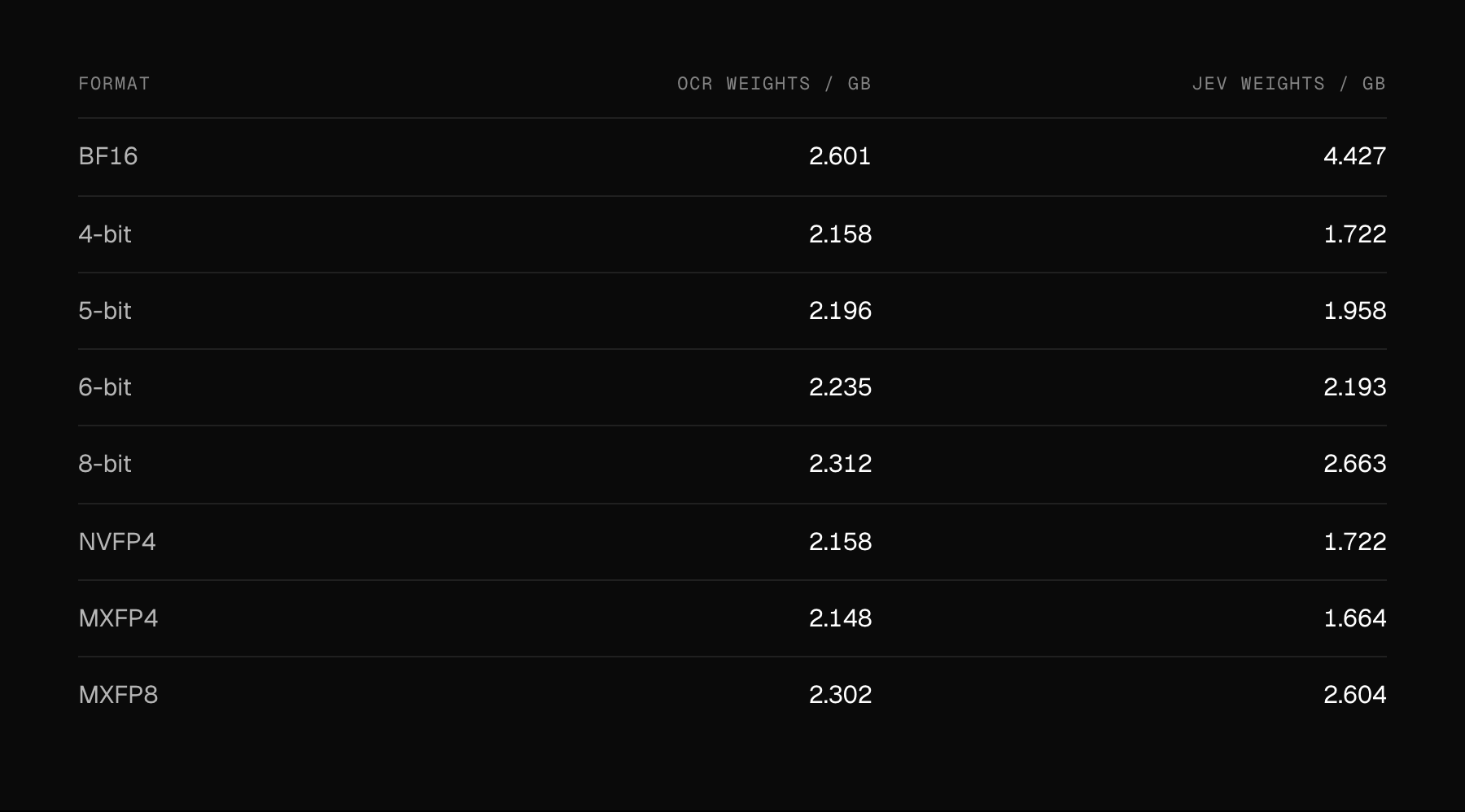
MiniCPM-OCR 1.0: BF16 · 4-bit · 5-bit · 6-bit · 8-bit · NVFP4 · MXFP4 · MXFP8
Jev: BF16 · 4-bit · 5-bit · 6-bit · 8-bit · NVFP4 · MXFP4 · MXFP8
Quantization is selective
The vision components remain in BF16. The OCR conversion also preserves embeddings, the output head, recurrent attention, and visual mergers; Jev preserves its score head. As a result, a 4-bit label describes the quantized layers, not every weight in the model. Whole-model savings are smaller than a uniform 16-to-4-bit conversion would suggest.
What the validation tells us
Across three OCR smoke-test inputs, 5-bit, 6-bit, 8-bit, and MXFP8 reproduced the BF16 text exactly. The other formats changed some outputs. For Jev, all seven quantized variants produced finite scores and retained all 12 BF16 decisions at a diagnostic 0.5 threshold. Scores still moved: the largest observed probability shift was about 0.073 for 4-bit.
These checks help catch conversion problems. They do not establish general OCR accuracy or calibrate a review threshold. Choose a precision and a threshold using representative documents, then test the entire deployed pipeline. Example OCR validation · Example Jev validation
From a page to a usable result.
On an Apple silicon Mac, install the merged implementation in an activated Python environment. This command pins the revision used for the port; the model links above provide the public MLX checkpoints.
python -m pip install \
  "git+https://github.com/Blaizzy/mlx-vlm.git@230fc308efb577d87446306bfb8a3e9f1a129558"
Parse an image. Replace page.png with your document image. For a PDF, rasterize the pages first and pass each page image to the model.
mlx_vlm.generate \
  --model nativ-community/MiniCPM-OCR-1.0-bf16 \
  --image page.png \
  --prompt "Convert this page to markdown." \
  --temperature 0 --max-tokens 4096
Assess a candidate. Save the candidate text and render it to an image, then supply both alongside the matching original crop.
python -m mlx_vlm.models.minicpm_ocr_jev \
  --model nativ-community/MiniCPM-OCR-Jev-bf16 \
  --orig-image original-crop.png \
  --render-image rendered-ocr.png \
  --ocr-text-file candidate.txt
That separation makes the workflow useful beyond a single OCR engine: extraction produces a candidate, and Jev provides a consistency signal for your review process. Local execution keeps document inputs on your machine once the software and weights are downloaded.
For searchable archives, invoice workflows, and document intake, this is a practical starting point: a compact parser, an explicit assessment step, and public models you can test against your own pages.
Sources and credits
OpenBMB / MiniCPM-OCR · Merged MLX-VLM implementation · OCR usage · Jev usage
Benchmarks: Nativ local measurements, 26 October 2026. Storage and conversion checks: 27 October 2026.