Download for macOS


Nemotron Transcribe on Nativ: speech understanding on Apple silicon

NVIDIA’s Nemotron-3.5-Transcribe-30B-A4B-EA brings several audio tasks into one model: transcription, speaker attribution, translation, and answers grounded in a recording. You can use it through Nativ, powered by MLX Audio, with inference running locally on Apple silicon.
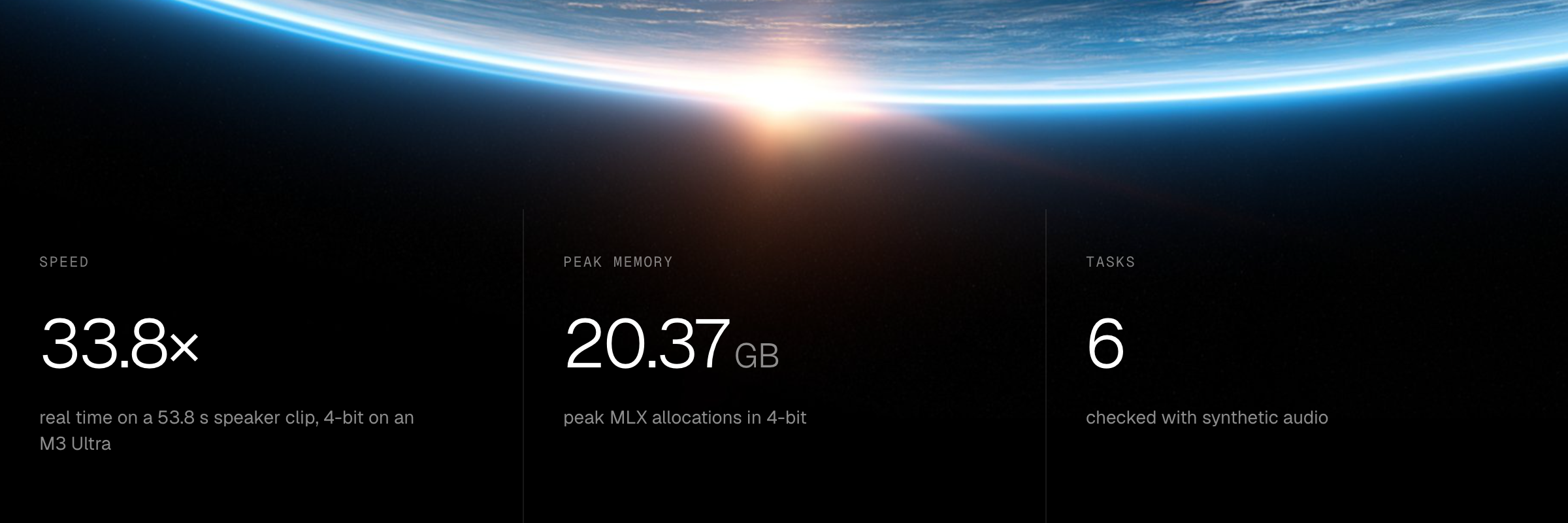
On an M3 Ultra, our 4-bit run processed a 53.8-second speaker-attribution clip in 1.59 seconds. That is 33.8× real time, including audio encoding and text generation. Here we look at the port, its precision choices, and what the model actually returns.
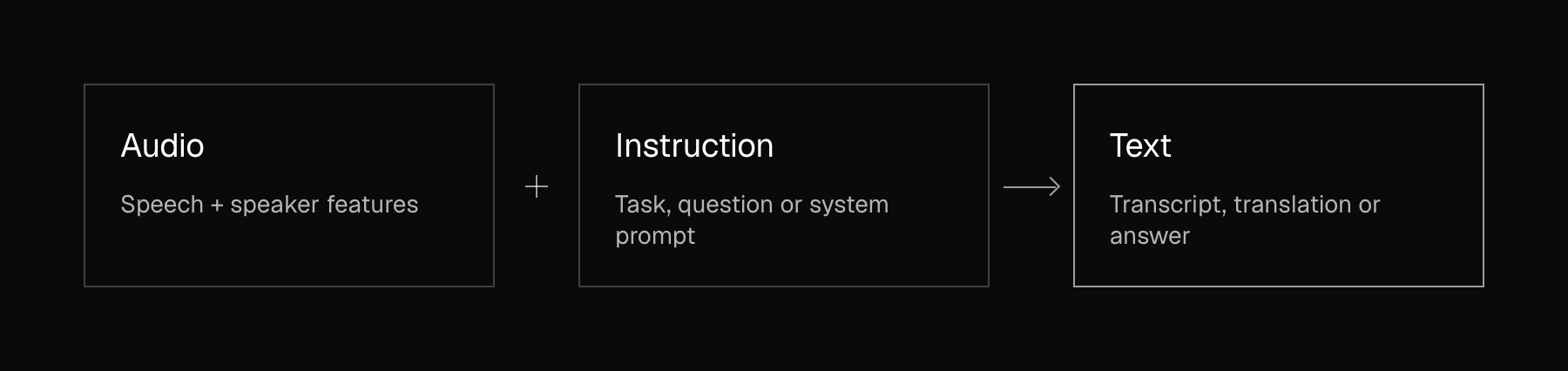
From sound to a text response
A speech encoder captures the recording, while a Sortformer branch adds speaker information. Their features feed a Nemotron-H language decoder that combines Mamba, attention, and mixture-of-experts layers. A task or written instruction guides the text it produces.
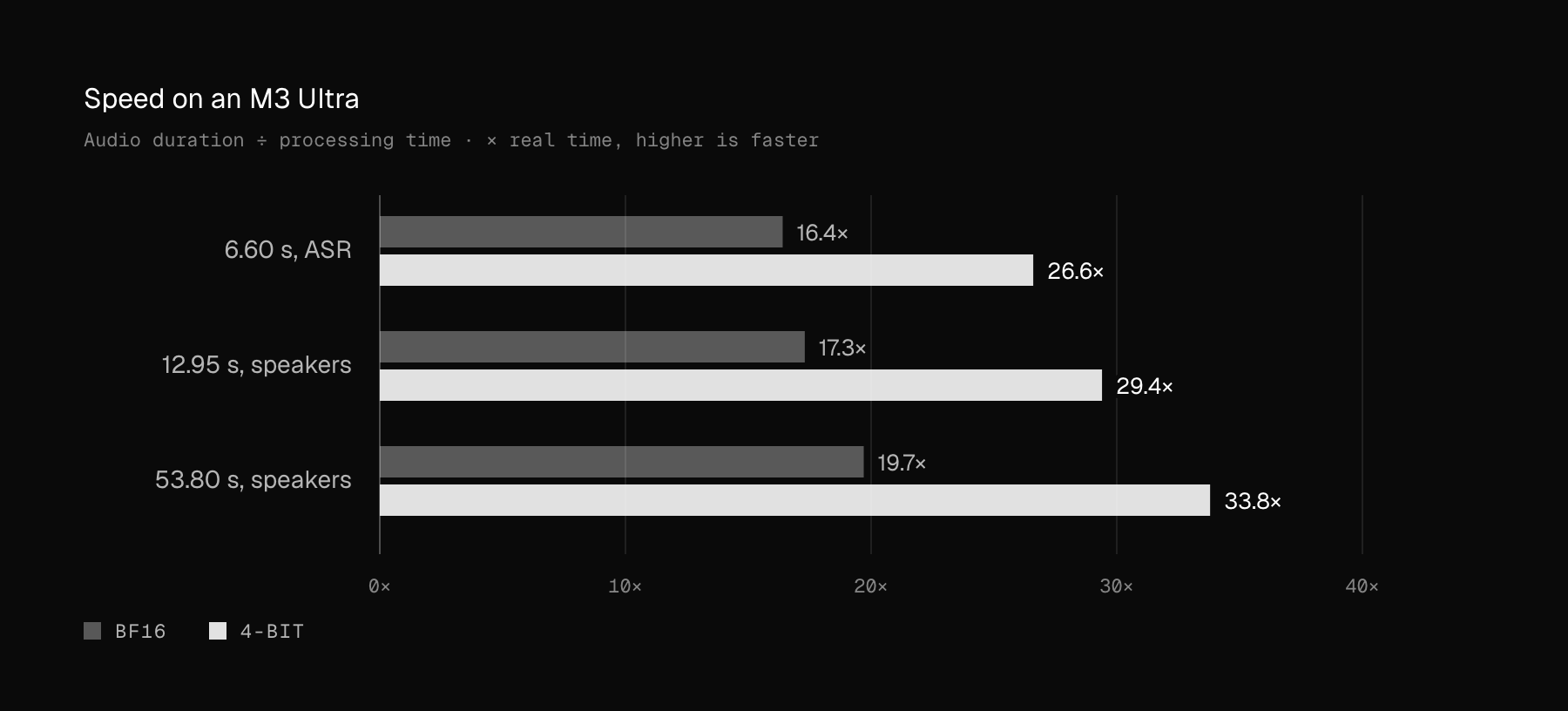
Speech at 33.8× real time
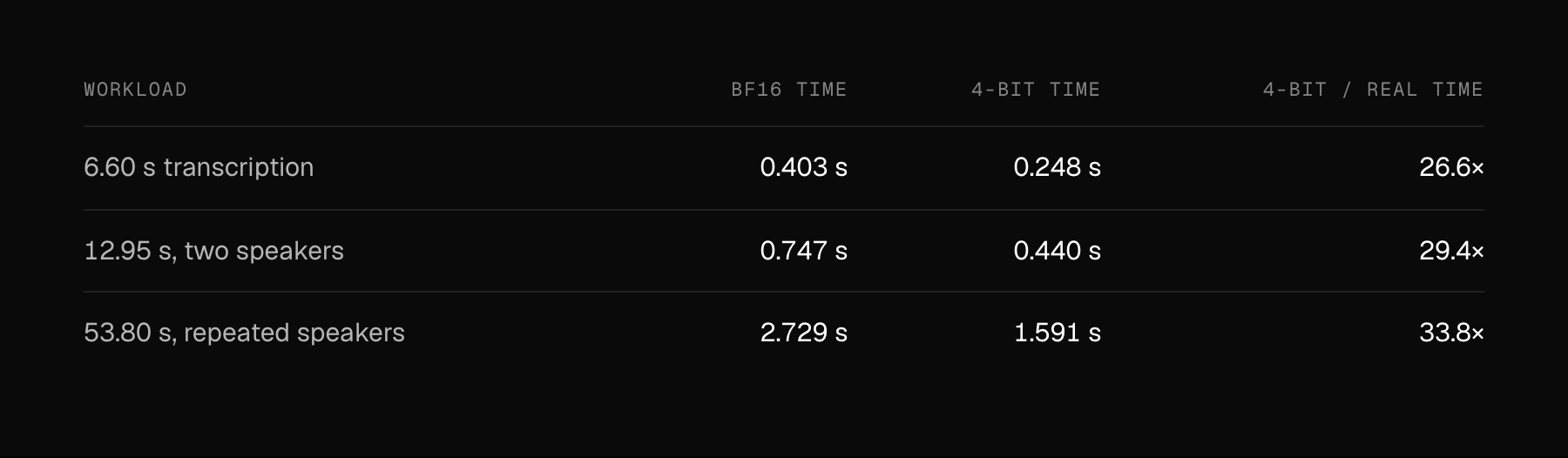
For the longest test, 53.8 seconds of audio took 1.591 seconds with the 4-bit model and 2.729 seconds in BF16. Dividing audio duration by processing time gives 33.8× and 19.7× real time. The equivalent 4-bit real-time factor is 0.030.
Memory and the first text
Across these workloads, peak MLX active allocations reached 65.62 GB in BF16 and 20.37 GB in 4-bit. These figures include model parameters, but exclude the allocator cache and non-MLX process memory. No swap was used.
On the 53.8-second clip, the first nonempty text chunk arrived at a median of 536 ms in BF16 and 445 ms in 4-bit. The entire recording is encoded before text generation starts. Text streaming therefore does not mean incremental microphone recognition.
What the measurements cover
We used an Apple M3 Ultra with 80 GPU cores and 512 GB unified memory, running MLX 0.32.4. Inputs were preloaded mono 16 kHz arrays. Timing includes audio encoding, prompt processing, and all text generation; checkpoint loading and file I/O are excluded.
Greedy decoding; maximum 768 output tokens. The MLX allocator cache was cleared before each run, while Metal kernels remained warm. The 53.8-second input repeats the 12.95-second two-speaker clip four times, with 0.5 seconds of silence after each. These workload tests do not establish long-meeting performance or accuracy. Measured 26 October 2026.
One recording. Different questions.
Your instruction selects the job. For these examples, we generated short audio inputs with Phonon, then sent the audio to Nemotron. The synthesis text was not supplied as a transcript. The excerpts below are actual 4-bit outputs from our server validation. The spoken input, an announcement:
Tomorrow’s design review starts at ten thirty in room four. Please bring the updated prototype.
Transcribe the recording
The ASR request returns the words spoken in the announcement, including “ten thirty in room four” and “the updated prototype.”
Ask about the audio
Written question: “What room is the design review in? Reply with only the room number.”
Model output: 4
Translate the speech
With German as the target language, the same recording returns:
Die Designprüfung für morgen beginnt um 10:30 Uhr im Raum vier. Bitte bringen Sie den aktualisierten Prototyp mit.
Attribute the speakers
A second voice adds: “I will bring the prototype and the latest test results.” The model assigns the announcement to <spk:0> and the reply to <spk:1>. Up to eight IDs are supported; they distinguish speakers within a recording.
Follow a spoken instruction
A separate recording asks: “What is twelve multiplied by seven? Answer with just the number.” With an instruction to answer the spoken question:
Model output: 84
Request rich transcription
Rich mode can include event and speaking-style tags. Our sample returned “We have wonderful news! The project is finished!” without extra tags. This example does not establish laughter or speaking-style detection.
Speaker IDs are not names, and this port does not provide word timestamps. Some quantized validation runs added a short utterance absent from the input. Check the transcript against the recording when fidelity matters.
Eight formats for the same model
We converted and checked BF16 plus seven quantized variants for nativ-community. Quantization applies to language-model modules; the audio perception components remain unquantized. Sensitive numerical parameters retain higher precision.
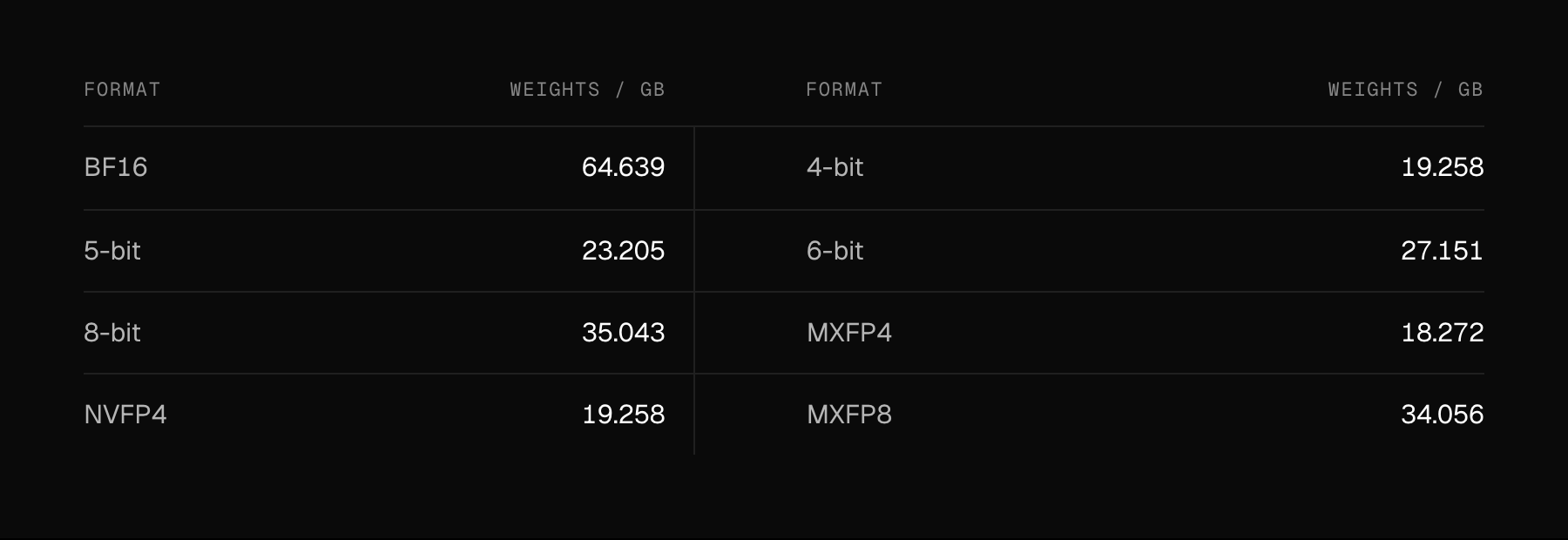
Every export was reloaded strictly and exercised on six tasks, with streamed transcription checked against the complete response. These smoke checks help catch conversion errors; they do not establish general accuracy. The controlled speed comparison covers BF16 and affine 4-bit only.
Use it through Nativ
You can use Nemotron Transcribe directly through Nativ to work with audio locally on your Mac. Developers can also use MLX Audio from Python: install the pinned implementation below, then load the 4-bit checkpoint and pass an audio file.
python -m pip install \
"mlx-audio[stt] @ git+https://github.com/Blaizzy/mlx-audio.git@92decb7577878ef8e9274c1a7e33084760be03aa"from mlx_audio.stt import load
repo = "nativ-community/Nemotron-3.5-Transcribe-30B-A4B-EA-4bit"
model = load(repo, strict=True)
print(model.generate("speech.wav").text)File inputs are resampled to mono 16 kHz; arrays must already use that format. The server integration in MLX-VLM PR #2618 forwards prompt, task and system_prompt. Seven real HTTP cases passed, including text streaming.
Nativ brings these audio capabilities to your Mac, while MLX Audio gives developers the same model in code. Once the software and weights are downloaded, recordings can be processed locally.
Download Nativ · Explore the six-task demo · Browse nativ-community
Early-access evaluation checkpoint. Performance and examples describe the tested port and workloads.