Download for macOS


Reverb on Nativ: voice cloning on Apple silicon
Record a few seconds of yourself reading one sentence, type the words you said, then paste in the talk you give tomorrow. A moment later you hear the talk in your own voice, and the recording never leaves your Mac.
That is Reverb, a new text-to-speech model from Software Mansion AI Labs. It clones a voice from a short clip, speaks seven languages and has 297M parameters. You can use it in Nativ, the local AI app for Mac, powered by MLX Audio, with everything running locally on Apple silicon.
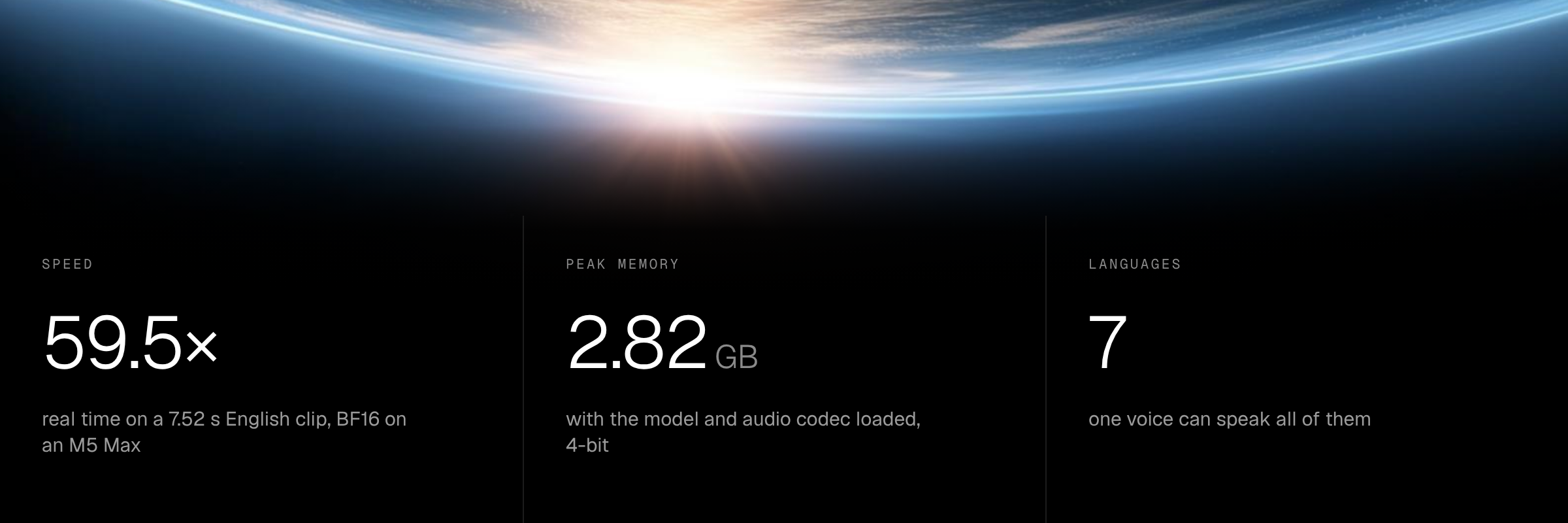
On an M5 Max, our BF16 run made 7.52 seconds of English speech in 126.5 ms. That is 59.5× real time, including the full audio decode. Here we look at how Reverb was made, what it does with a short clip, and how it runs on a Mac.
From a few seconds of speech to a new voice
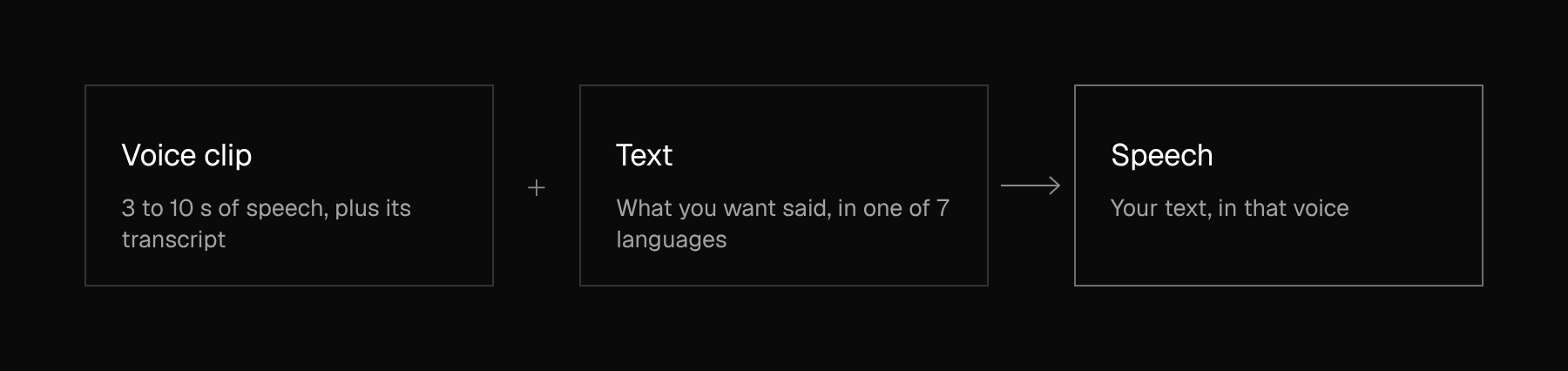
Reverb needs three things: a short recording of a voice, the exact words spoken in it, and the text you want to hear. It is a masked-diffusion model. Instead of making one sound after another, it lays out a grid of audio tokens for the whole utterance and fills it in over 16 passes, guided by your text and by the reference voice. An audio codec, the Higgs Audio v2 tokenizer, then turns the finished grid into 24 kHz sound.
How Software Mansion made it smaller
Reverb starts from OmniVoice, an open 613M-parameter model from the k2-fsa team. Software Mansion AI Labs pruned it with distillation, removing 4 of its 28 transformer layers, slimming the feed-forward and attention layers, and cutting the text vocabulary from 151,676 to 62,035 tokens. They retrained it in seven languages on cleaned open speech data, then ran several rounds of preference tuning against an automatic judge fitted to human rankings.
The result has 297M parameters, less than half of OmniVoice’s, and Software Mansion reports it generates speech 10× to 20× faster than the original.
Quality, in Software Mansion’s numbers
Software Mansion compared Reverb with other open models on the MiniMax test set from the Open TTS Leaderboard: seven languages, 100 sentences each, with every model cloning a reference recording. Reverb’s word error rate was 1.03% and its speaker similarity (SIM-o) 0.817, against 1.13% and 0.833 for OmniVoice. On the leaderboard’s MiniMax set itself, they list 0.96%. These scores describe their release. Our runs below measure speed and memory, not accuracy.
Speech at 59.5× real time
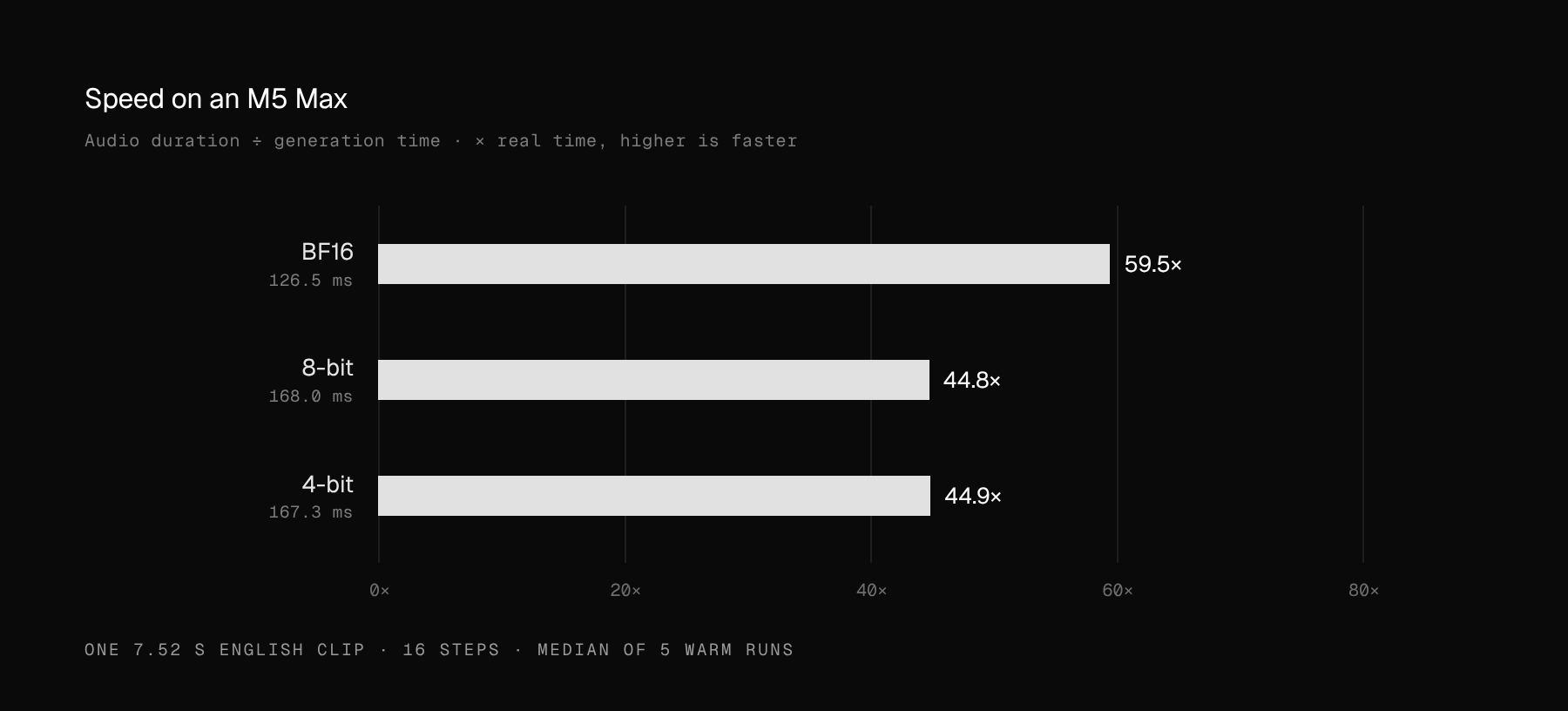
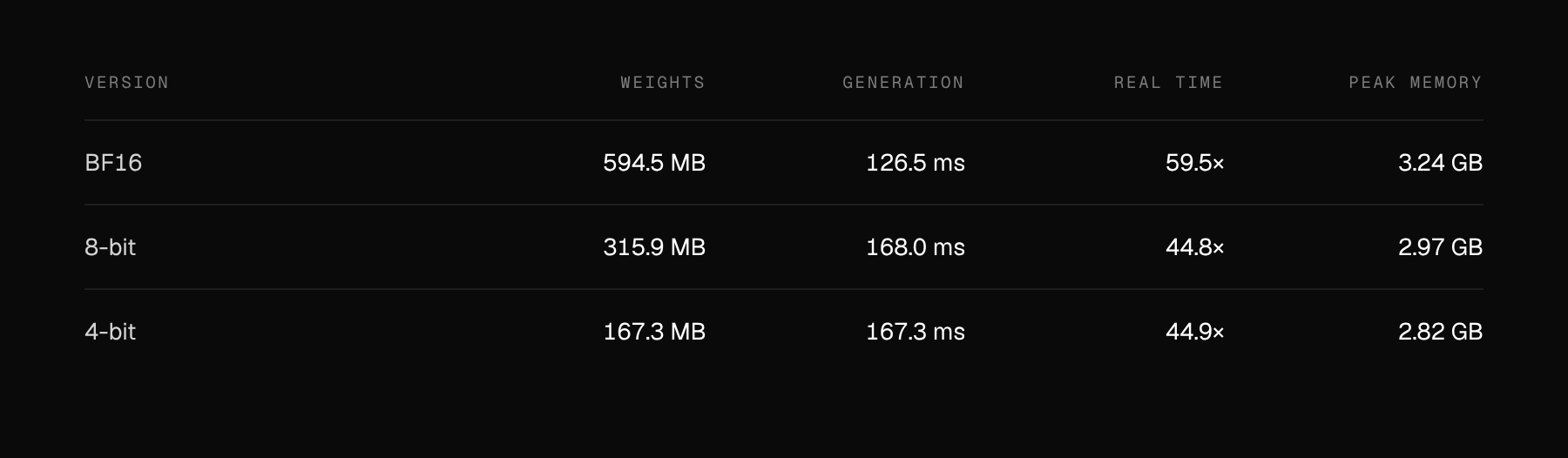
For one 7.52-second English sentence, BF16 took 126.5 ms, 8-bit 168.0 ms and 4-bit 167.3 ms. Dividing audio duration by generation time gives 59.5×, 44.8× and 44.9× real time. The equivalent BF16 real-time factor is 0.0168.
BF16 is the fastest here. The 8-bit and 4-bit versions trade some speed for smaller weights and less memory.
Fewer passes, faster speech
The 16 passes are a setting. With 4, BF16 made the same sentence in 51.1 ms; with 32, it took 226.4 ms. Every setting returned the right words for this one sentence, but that does not show the same prosody or quality, so the default stays at 16.
Memory and the first sound
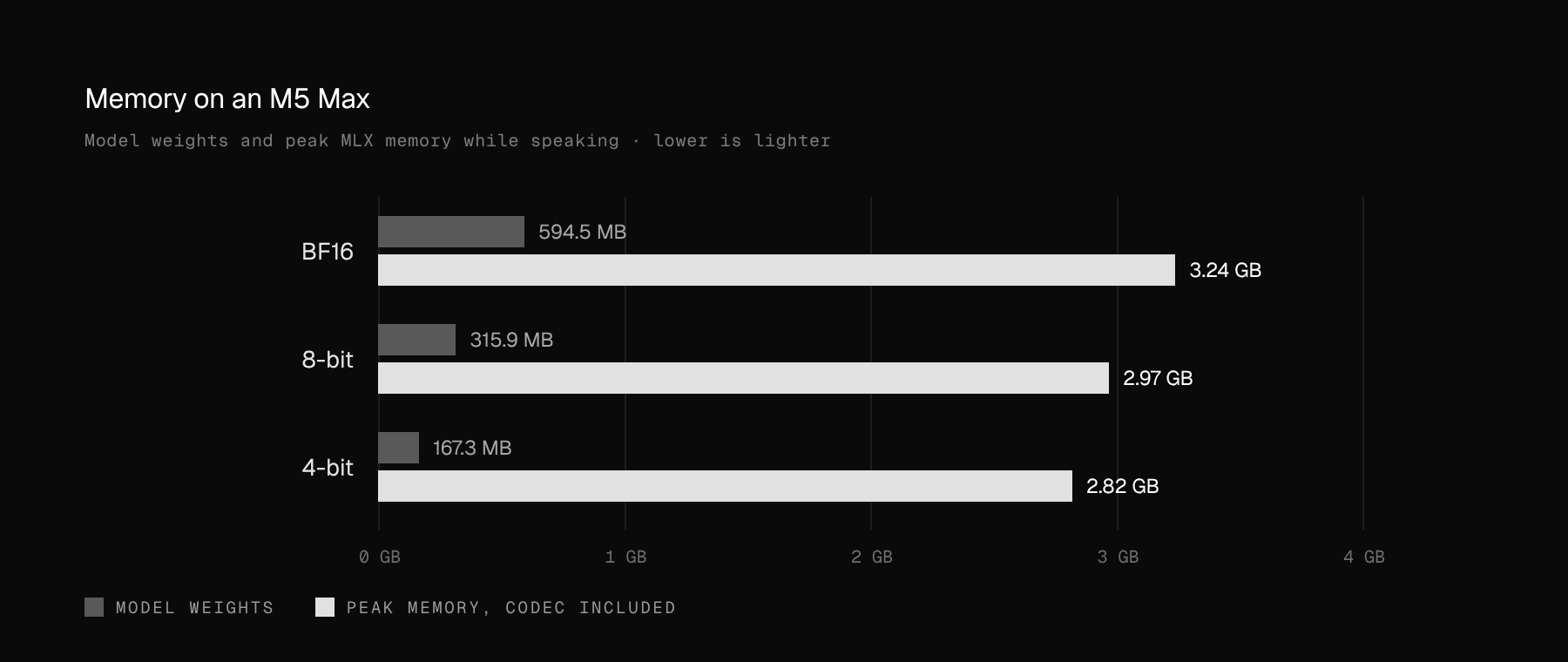
Peak MLX memory reached 3.24 GB in BF16, 2.97 GB in 8-bit and 2.82 GB in 4-bit, with the text model and the audio codec loaded. These are MLX active allocations, not total process memory.
Weights are only part of that. Each version carries the same 805.7 MB FP32 audio codec, and going from BF16 to 4-bit saves 427 MB of weights, about as much as peak memory drops.
Reverb does not stream. It makes a whole stretch of speech, then decodes it, so with BF16 the full 7.52 seconds were ready 126.5 ms after the request. In an app, buffering and the audio device add a little to that wait.
What the measurements cover
We used an Apple M5 Max with 128 GB of unified memory, running macOS 27.2 and MLX 0.32.4, with the Reverb port in MLX Audio PR #1222. Each version ran in its own process: one discarded warmup, then five timed runs with seed 42, and we report the median.
Timing covers text preparation, prefix prefill, 16 unmasking steps and the full audio decode; model loading and file writes are excluded. Every output uses the same standard male reference voice and a 7.5-second requested length, 7.52 seconds after frame rounding, as mono 24 kHz audio. Memory is the peak of MLX active allocations, including the text model and the FP32 codec. One sentence does not establish long-form performance or quality. Measured 19 November 2026.
One voice. Seven languages.
The reference clip picks the voice, and your text picks the language. The clip can be a single sentence, like this one:
I’m recording this so my notes can read themselves back to me.
Clone a voice
Reverb reads new text in the voice from the clip, keeping its timbre, pace and tone. There is no training step. In our run, reading and encoding a reference recording, then making the same 7.52-second sentence, took 145.6 ms with BF16, or 51.7× real time. That test re-encoded the standard male voice that ships with the model, so it measures speed, not how close a clone sounds.
Speak another language
The same voice can read any of Reverb’s seven languages: English, German, French, Spanish, Italian, Polish and Portuguese. It sounds most natural in its own, so try a short line first, such as:
Dzień dobry! Spotkanie zaczyna się jutro o dziesiątej.
Let the reference set the mood
Reverb has no emotion setting. The reference sets it: read your clip calmly and the new speech comes back calm, record it with energy and you get energy back.
Reverb copies the whole recording, not just the voice: room echo, background noise and the color of the microphone carry over, so record somewhere quiet. It speaks only its seven languages. And clone only voices you have the right to use: get the speaker’s consent, don’t imitate real people, and tell listeners when a voice is synthetic.
Three versions for your Mac
We benchmarked three MLX versions converted from Reverb’s FP32 weights: 594.5 MB in BF16, 315.9 MB in 8-bit and 167.3 MB in 4-bit. The converter keeps the 805.7 MB audio codec at its original FP32 precision, so every version carries the same codec.
Every version passed the same short checks: one sentence in each of the seven languages, transcribed back by Parakeet TDT 0.6B v3 with zero word errors, 110 words per version. These checks catch conversion errors; they do not establish general accuracy. Exact parity with Software Mansion’s own optimized sampler is not verified yet: the port uses MLX Audio’s OmniVoice unmasking schedule with distilled guidance.
Use it through Nativ
In Nativ, Reverb gives you local text-to-speech in a voice you choose. Developers can use the same model from Python with MLX Audio: install the pinned implementation below, then load Reverb and pass a reference clip with its transcript.
python -m pip install \
"mlx-audio[tts] @ git+https://github.com/Neywa-Labs/mlx-audio.git@c789b108f67d2455c83dcb0a00a84f22f4e40523"from mlx_audio.tts.utils import load
from mlx_audio.audio_io import write
model = load("software-mansion/Reverb-TTS")
result = next(model.generate(
text="Here are today's notes, in my own voice.",
ref_audio="my_voice.wav",
ref_text="I'm recording this so my notes can read themselves back to me.",
lang_code="en",
))
write("notes.wav", result.audio, result.sample_rate)Loading software-mansion/Reverb-TTS downloads the FP32 checkpoint and the audio codec, then keeps a BF16 copy in your cache for offline use. Keep the reference under 10 seconds, with ref_text matching it word for word; longer clips raise an error unless you raise ref_audio_max_duration_s. Without a reference, the port speaks with one of three preset voices, standard_male by default. For 8-bit or 4-bit weights, convert with mlx_audio.tts.models.reverb.convert.
Nativ brings Reverb to your Mac, and MLX Audio gives developers the same model in code. Once Nativ and the weights are downloaded, your voice clip and every word Reverb speaks stay on your Mac.
Download Nativ · Read the Reverb model card · See MLX Audio PR #1222
Reverb’s weights are released under CC BY-NC 4.0, for non-commercial use with attribution, and its code under Apache 2.0. Speed and memory figures describe the MLX port in PR #1222 on one Mac; quality figures are Software Mansion’s.